
FreeSurfer reconstructs the brain’s cortical surfaces from a T1-weighted MRI and measures things such as cortical thickness, surface area and the volumes of subcortical structures. Its main command, recon-all, runs a long automated pipeline. This article explains what it does and how to use it responsibly.
Learning objectives
- Describe what recon-all produces.
- Explain why surface-based analysis differs from voxel-based analysis.
- Run and organise a basic recon-all job.
- Know where manual quality control is required.
What recon-all does
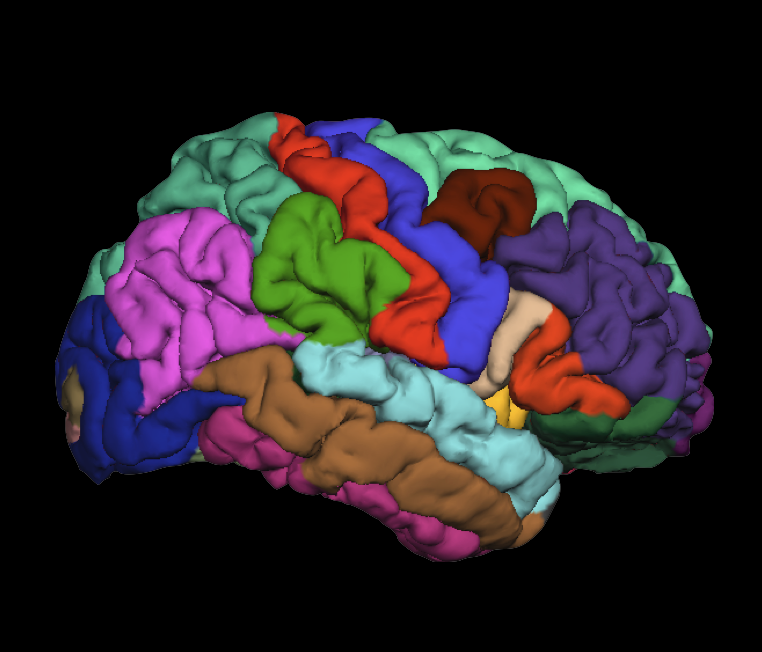
In outline, recon-all removes the skull, corrects intensity inhomogeneity, segments white matter and subcortical structures, builds a surface at the gray-white boundary and another at the pial surface, and then measures thickness as the distance between them. It also inflates and registers the surfaces to a common spherical atlas so that results can be compared between people.
Why surfaces?
The cortex is a folded sheet. Surface-based methods respect that geometry, so measures like thickness are sampled along the cortex rather than blurred across neighbouring folds, as can happen with voxel-based smoothing.
Running it
# Illustrative. Check the documentation for your FreeSurfer version.
export SUBJECTS_DIR=$HOME/freesurfer_subjects
recon-all -s sub-01 -i sub-01_T1w.nii.gz -all
Expect a run of several hours per subject. Jobs are usually launched in parallel on a cluster or a multi-core workstation.
Outputs to know
| Folder | Contents |
|---|---|
| mri/ | Volumes: segmentations, brain masks, normalised T1 |
| surf/ | Surface files such as white and pial surfaces |
| label/ | Cortical parcellations |
| stats/ | Summary measures such as thickness and volume tables |
Quality control
Automated reconstruction can fail quietly. Common problems include errors in the skull strip, surfaces that cross into dura or vessels, and misplaced white-matter boundaries in images with motion or poor contrast. Inspect every subject, and correct or exclude problem cases according to a written protocol decided before the analysis.
Key takeaways
- recon-all builds cortical surfaces and measures thickness, area and volumes.
- Surface analysis follows the folded geometry of the cortex.
- Runs take hours; plan computing accordingly.
- Visual quality control is essential.
SpinLab can generate a complete script for workflows like this from the steps you choose.
Frequently asked questions
Can recon-all run on any MRI?
It is designed for T1-weighted images of good quality. Other contrasts and very low resolution may need different handling.
Is the result a real measurement?
Cortical thickness estimates depend on image quality and software version, so compare only data processed the same way.
References and further reading
- Fischl B. FreeSurfer. NeuroImage. 2012;62:774-781.
- Dale AM, Fischl B, Sereno MI. Cortical surface-based analysis. I. Segmentation and surface reconstruction. NeuroImage. 1999;9:179-194.
- FreeSurfer documentation: surfer.nmr.mgh.harvard.edu
Related articles
- Getting started with FSL
- Image registration with ANTs: an overview
- BIDS basics
- Install FreeSurfer on Windows with WSL 2
- Cite FreeSurfer correctly with the Methods Generator
Last reviewed: 4 November 2026. Educational overview. Commands are illustrative: options change between versions, so check the official documentation for the version you install. Do not process identifiable patient data outside approved systems.