Getting started with FSL: brain extraction and registration

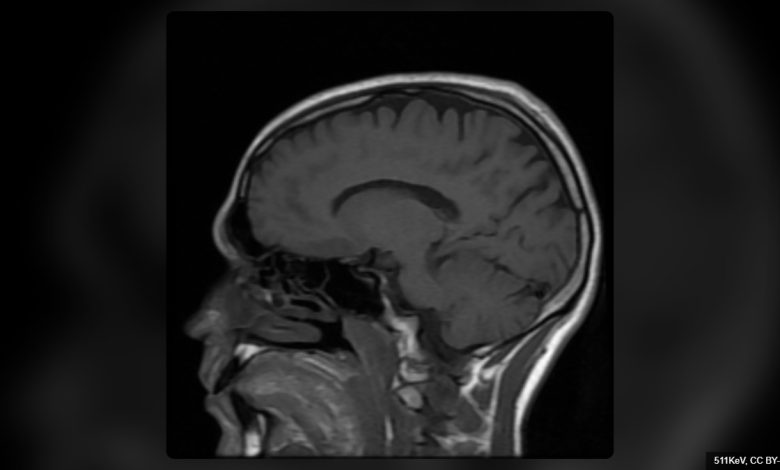
FSL (the FMRIB Software Library) is one of the most widely used toolkits in neuroimaging research. It covers structural, functional and diffusion MRI, and its command-line tools chain together neatly in shell scripts. This article introduces the core ideas and a typical structural workflow.
Learning objectives
- Name the main FSL tools for brain extraction, segmentation and registration.
- Explain the difference between linear (FLIRT) and non-linear (FNIRT) registration.
- Read and write a simple FSL command-line workflow.
- Know the checks to run before trusting any result.
What FSL contains
| Tool | Purpose |
|---|---|
| BET | Brain extraction (skull stripping) |
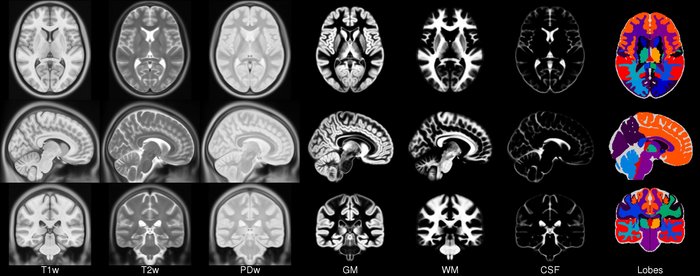
| FAST | Tissue segmentation into gray matter, white matter and CSF, with bias-field correction |
| FLIRT | Linear (affine) registration |
| FNIRT | Non-linear registration |
| FEAT | Task and resting-state functional MRI analysis |
| FDT | Diffusion MRI processing and tractography |
| fslmaths / fslstats | Image arithmetic and measurements from the command line |
A typical structural workflow
- Convert DICOM to NIfTI and organise the data (see From DICOM to BIDS with HeuDiConv).
- Extract the brain with BET.
- Segment tissues with FAST.
- Register to a standard space with FLIRT, then FNIRT if non-linear alignment is needed.
- Quality check every output by viewing it.
# Illustrative commands. Check options for your FSL version.
bet sub-01_T1w.nii.gz sub-01_T1w_brain -R -f 0.4
fast -B -o sub-01_seg sub-01_T1w_brain
flirt -in sub-01_T1w_brain -ref $FSLDIR/data/standard/MNI152_T1_2mm_brain \
      -out sub-01_to_MNI_lin -omat sub-01_to_MNI.mat
The “-f” value in BET sets the fractional intensity threshold and often needs adjusting for different images, which is why visual checking matters.
Linear versus non-linear registration
Linear registration (FLIRT) finds a rotation, translation, scaling and shear that best aligns two images. It is fast and robust, and is the usual first step. Non-linear registration (FNIRT) allows local warping, which matches anatomy more closely but can over-fit if the images are poor. Choose according to how precise the alignment must be and always inspect the result.
Common pitfalls
- Accepting default brain extraction without looking at it.
- Mixing image orientations or forgetting to check left-right conventions.
- Not recording software versions, which makes results harder to reproduce.
- Running a script on a whole dataset before testing it on one subject.
Key takeaways
- FSL gives you modular command-line tools for the main neuroimaging steps.
- Linear registration first; non-linear when you need local accuracy.
- Check every intermediate result by eye.
- Record versions and commands for reproducibility.
SpinLab can generate a complete script for workflows like this from the steps you choose.
Frequently asked questions
Is FSL free?
FSL is free for academic non-commercial use under its licence. Check the current licence terms for other uses.
Do I need Linux?
FSL runs on Linux and macOS. Windows users commonly use the Windows Subsystem for Linux.
References and further reading
- Jenkinson M, Beckmann CF, Behrens TEJ, Woolrich MW, Smith SM. FSL. NeuroImage. 2012;62:782-790.
- Smith SM. Fast robust automated brain extraction. Hum Brain Mapp. 2002;17:143-155.
- FSL documentation: fsl.fmrib.ox.ac.uk/fsl/docs
Related articles
- FreeSurfer recon-all: an overview
- Image registration with ANTs: an overview
- BIDS basics
- FSL design files explained with SpinLab
- Install FSL on Windows with WSL 2
Last reviewed: 4 November 2026. Educational overview. Commands are illustrative: options change between versions, so check the official documentation for the version you install. Do not process identifiable patient data outside approved systems.